Travian Bot Launch: Alliance Bonus Pushes and Troop Management
Welcome to our very first blog post. It’s been an incredibly busy 48 hours with several new updates, and I’m so excited to finally share them with you. Here’s a quick look at what’s changed:
Alliance Bonus Pushes
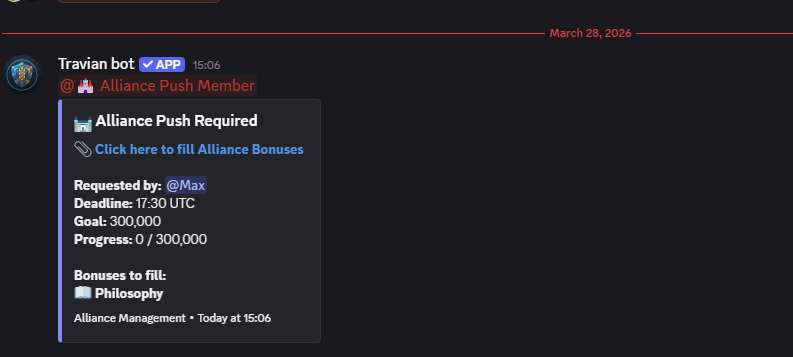
One of the most important parts of Travian is upgrading your alliance bonuses. Like defense pushes and resource pushes, this feature works through a channel-based messaging system. You will start by posting a message in your designated Alliance Push Request channel, and the bot will automatically create a new channel where users can report what they have contributed. The channel will close once the request is fully completed.
Example of request:
Manage Your Troops
This feature is designed to reduce the need for external websites and keep everything inside Discord as
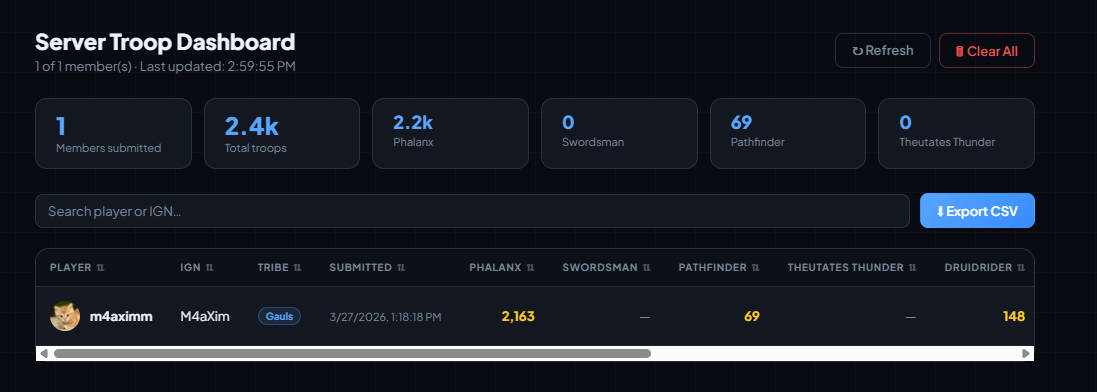
much as possible. Any member of your guild can now use /troops-parse to generate a URL for
importing their troops. This works the same way as in Travian by navigating to:
Village → Troops → Own Troops
(Note: this feature requires Travian Plus.)
After importing, users on the server who have the Manage Server permission can access
the web UI using command /view-server, where they can view all troops belonging to alliance
members.
In Cases of Maintenance
I understand that maintenance can occur at any time and may disrupt operations for everyone, especially since Travian is a time-sensitive, click-based game. If maintenance happens, you will receive free trial time once the service is restored, equal to the duration during which the bot was not operational.
If the downtime exceeds 12 hours, you will receive an additional 12 hours plus the total outage time. I believe this is the best overall solution when an issue occurs.
That’s all for now! I am working constantly to make the bot better for you, so if you have any
suggestions, questions, or bugs to report, I’d love to hear from you. Feel free to reach out anytime
using /support.
Till next time,
Max