Voting Limits, Referrals, Maintenance Time, and Custom Contracts
Hello everyone,
This post explains a few access rules that are easy to mix up: the base server trial, the first
12-hour preview window, voting rewards, referral rewards, maintenance compensation, and the new
/contract command.
Base Trial and Voting Are Not the Same Thing
Every newly added Discord server receives a 3-day no-card base trial. That trial is meant to let the server test the bot quickly without entering payment details.
The first 12 hours of that base trial are a full preview. During that first preview window, the server qualifies for the full-preview tier used by extension screenshots, troop submission, artefact leaderboard, the full actions dashboard, and automatic transcripts.
After those first 12 hours pass, the server can still have base trial time left, but it moves to the limited no-card trial tier. Generated action channels are then limited unless the server moves to the 3-day free trial, activates a paid key, has a custom contract, or earns enough vote support.
Voting is separate from the base trial. A Top.gg vote can create a support credit, but it is not a replacement for paid access, a Paddle trial, or a custom contract. Vote-earned time is temporary support time, and some premium workflows can still require full access.
This 12-hour voting cooldown is separate from the first 12-hour base-trial preview. Voting does not reset the full-preview window. The base server trial remains a 3-day no-card trial; voting can only add limited support time on top of the server's access window.
Current Voting Limits
Voting affects generated action limits. On limited trial or vote-access tiers, the default generated action limit is 2 active channels and 4 new generated action channels per CEST/CET day. Generated action channels include defence, resource push, alliance push, and fake attack coordination channels.
If the server has 5 unique voters in the last 24 hours, those limits increase to 4 active channels and 8 new generated action channels per CEST/CET day. At 10 unique voters in the last 24 hours, those limits increase again to 8 active channels and 16 new generated action channels per CEST/CET day. If the server reaches 20 unique voters in the last 24 hours, generated action channels become unlimited from voting support while that voter threshold remains true.
To see your current access tier, active generated action count, daily usage, linked-channel profile, and
what you need to increase limits, run /check-limits in your Discord server.
During the global event, reward amounts and caps are controlled by the event window. The current event runs until June 8, 2026, with boosted rewards while the boosted pool is still available and smaller event rewards after that pool is used.
Approved Suggestion Rewards
Suggestions can also earn temporary key access. If your suggestion is approved, the first approved suggestion creates a user-owned 48-hour license key.
After that, each later approved suggestion from the same user adds 24 hours to the same suggestion reward key. If the key has not been activated yet, the stored key duration increases. If the key is already active, its expiry is extended. If it already expired, it is renewed from the current time for 24 hours.
The same suggestion cannot be rewarded twice, and suggestion reward keys can only be activated by the Discord user who earned them.
Referral Rewards
Servers can also earn full-feature access by referring another server. Run /create-ref-code
in your server to create or view that server's referral code. The command returns the existing code if
one was already created, so each server keeps one reusable referral code.

/create-ref-code to get the referral code for your server.Another server can enter that code during /setup. The code is optional, and it can also be
left blank. A server cannot redeem its own referral code, and each referred server can only use one
referral code.
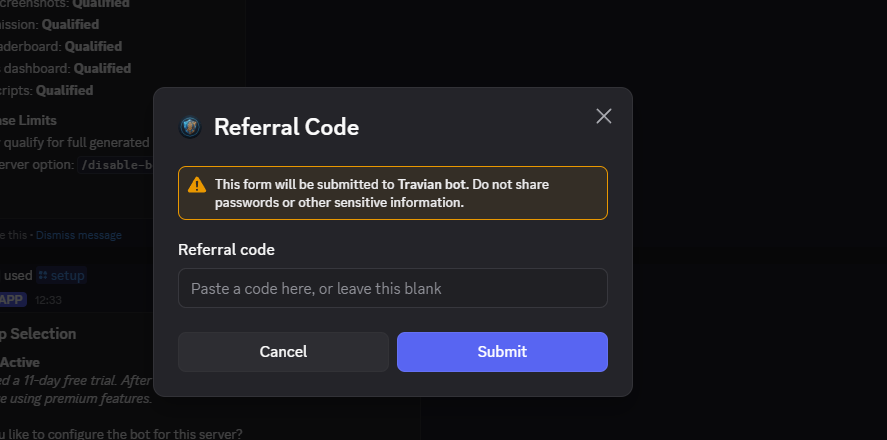
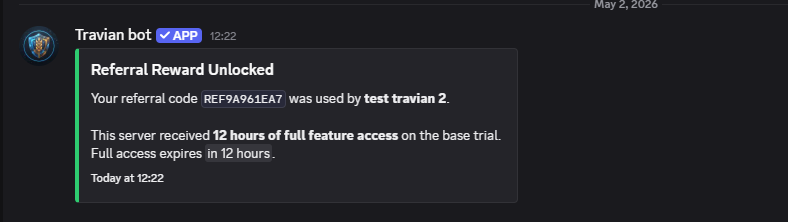
/setup before quick or manual setup starts.When the referral is accepted, the referring server receives 12 hours of full feature access on the base trial. The reward is applied to the server that created the code, not the server entering the code. If the referring server already has active full-access referral time, another successful referral adds 12 more hours from the existing expiry; otherwise, it starts from the current time.
Maintenance Compensation
When the bot is put into maintenance mode, access may be interrupted. When maintenance ends, the bot calculates the downtime and applies free trial/support time to configured servers.
If maintenance lasts less than 12 hours, the normal compensation is the downtime duration. If maintenance lasts 12 hours or longer, the compensation is the downtime duration plus an additional 12 hours. So a 12-hour outage becomes 24 hours of base compensation.
Servers with active keys get a stronger protection. If the calculated maintenance credit is small enough, keyed servers receive 2x the time. If the calculated credit is larger, the keyed server receives the normal maintenance credit plus an extra amount on top, capped at 6 additional hours.
Example: if maintenance lasts 13 hours, the base maintenance credit is 25 hours: 13 hours of downtime plus 12 extra hours. A keyed server then receives 25 hours plus the premium extra, capped at 6 hours, for a total of 31 hours.
Maintenance compensation is added as bonus time. If a server has active keys, those keys are also paused forward by the credited amount, so key holders do not lose paid access time during maintenance.
Custom Contracts With /contract
The /contract command is for servers that want a negotiated agreement instead of the normal
public checkout path. It is useful for multi-server groups, special durations, unusual usage patterns,
or groups that need a custom total price.
When you run /contract, you enter the total price you are offering, the requested duration,
and how many Discord servers the contract should cover. The bot reviews the request using the server
size, recent activity, requested length, and number of covered servers. If the offer is fair, it sends
you a DM to confirm it. If it is too low, the bot can negotiate with you in DM and suggest a counteroffer.
After you confirm the offer, it is sent to the developer for final approval. If approved, you receive a payment link. Once payment is confirmed, contract access is activated automatically and license keys are issued for the covered servers.
Final Notes
The short version is simple: the 3-day base trial helps new servers test the bot, voting can raise
generated action limits, approved suggestions can earn temporary key time, maintenance compensation
protects users during downtime, and /contract is the custom route for negotiated access.
Regards,
Max