Email Notifications, Welcome Chat, Role Select, Temporary Verify, and Server Creation
Hello everyone,
This update is focused on server management and member onboarding. It adds email notifications for new
request channels, a cleaner welcome verification channel, a separate role selection channel, temporary
verification for unverified members, and a new /create-me-a-server command for building
Discord server layouts faster.
Email Notifications for New Requests
Members can now receive email alerts when important request channels are created. This is useful for people who cannot always watch Discord but still need to know when a defence call, resource push, alliance push, fake attack request, or artefact request happens.
To enable it, run /mail-notifications setup and enter the email address that should receive
alerts. The bot sends a 6-digit OTP to that address. After that, run
/mail-notifications verify with the code from the email.

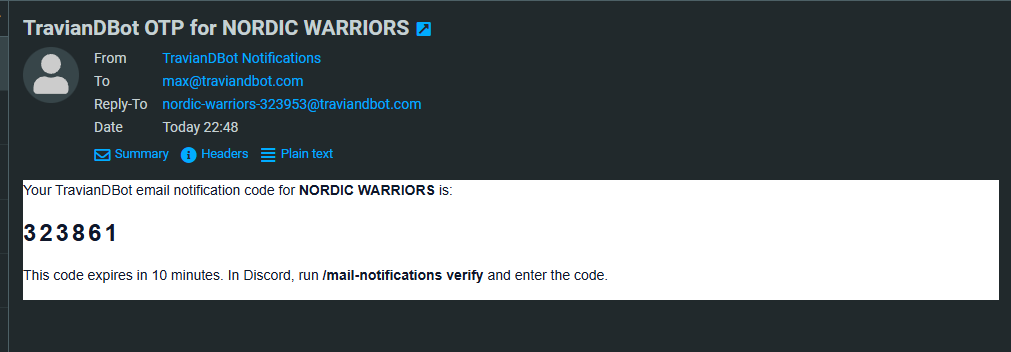
Once verified, emails are sent from the server-specific sender address and include the request type, the Discord server name, request details when available, and a direct link to open the created request channel.
/mail-notifications status.
You can also use /mail-notifications disable and /mail-notifications enable
if you want to pause or resume alerts without setting up the address again.
Welcome Chat Verification
The new /welcome-chat command creates or refreshes a dedicated welcome channel. New members
can press the Verify button, enter their Travian IGN, and receive the configured verified role after the
bot finds that player on the map.
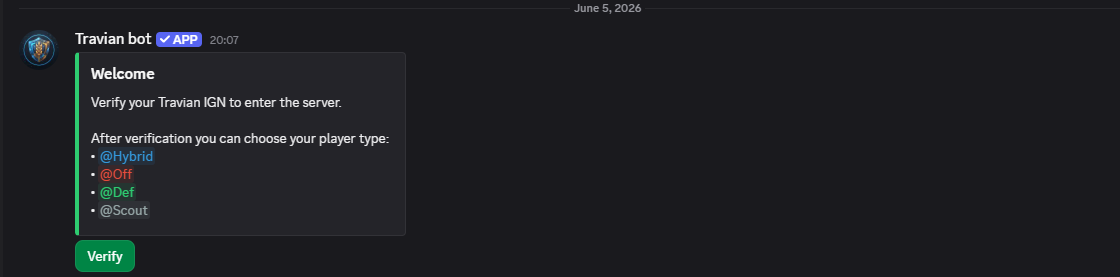
If alliance-restricted verification is enabled in setup, the same welcome flow also checks the player's detected alliance before granting the role. This keeps the welcome channel simple for members while still following the verification rules configured by server leadership.
After verification, the member can choose the configured player roles. The current welcome roles are
Hybrid, Off, Def, and Scout. If
those roles are not configured yet, /welcome-chat can create them automatically.
Separate Role Select Channel
There is also a separate /role-select command now. It creates or refreshes a
#role-select channel with buttons for the same configured player roles.
This is useful after members are already verified. Instead of asking an admin to adjust roles manually, members can open the role select channel and toggle their own Hybrid, Off, Def, or Scout roles.
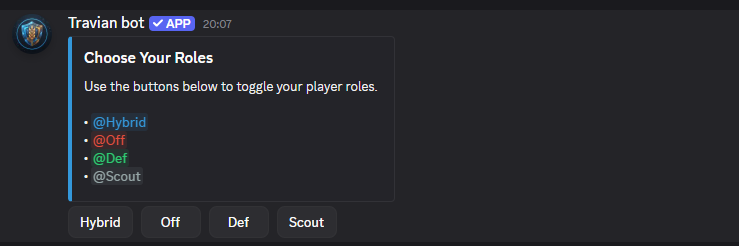
/welcome-chat and /role-select are admin setup
commands. The bot also needs permission to manage the welcome and role selection channels, and its role
must be above the roles it needs to assign.
Temporary Verify
The /temporary-verify command gives unverified members the verified role for 12 hours. It
scans the server, skips bots, skips users who are already verified or already have the verified role,
and grants temporary access to the remaining members.
Each member who receives the temporary role also gets a DM explaining that the role is temporary and will be removed after 12 hours. The command response shows how many members were scanned, how many were granted temporary access, how many were already verified, and whether any role or DM failures happened.
This is mainly for leadership situations where a server needs to open access quickly while still keeping normal verification as the long-term flow.
Create Me A Server
The new /create-me-a-server command helps admins build a Discord server layout from a
written description. This is a feature I am especially proud of because it solves one of the most
annoying parts of starting or reorganizing a Discord server: creating all the roles, channels,
categories, private areas, and permissions by hand.
Instead of clicking through Discord settings for half an hour, you can describe what you want in normal words. For example, you can ask for a Travian alliance server with a leadership area, defence coordination, attack planning, artefact channels, public chat, voice rooms, and a private staff section. The bot then turns that idea into an actual server structure.
The command opens a form where you write the kind of server you want. You do not need to use perfect formatting. You can write it like you would explain it to another admin: what roles you need, what areas should exist, who should see them, and what should be private.
It also pays attention to where you run the command. If you run it inside a category and ask it to add more channels there, it can use that category instead of creating a duplicate. If you ask it to copy the style or permissions from the current channel, it can use that as the example. That makes it useful not only for fresh servers, but also for improving a server that already exists.
The command can create normal text channels, voice channels, announcement-style channels, forum-style areas, categories, and roles. It can also set up private areas for leadership, staff, or specific groups. This is helpful for alliances that want clean separation between public member chat, war rooms, defence calls, leadership planning, and restricted coordination spaces.
It can also help with reorganizing. If your server has grown messy over time, you can ask it to rename channels, move channels into better categories, lock a channel, unlock a channel, set a topic, add slowmode, copy permissions from another channel, or clean up old structure when needed. So it is not just a setup command; it is also a server management helper.
For people who like being very specific, the command also understands a more direct format. You can write
lines such as role: Leadership | color: #5865F2 or
text: defence-calls | category: War Room | private: true. But that is optional. The main
point is that you can describe the result you want, and the bot handles the Discord setup work.
After it finishes, the bot sends a clear summary. It shows how many roles, categories, channels, and changes were completed. If something could not be done, it tells you why. For example, it may say that a role already existed, a channel could not be found, or the bot did not have enough permission to make a certain change.
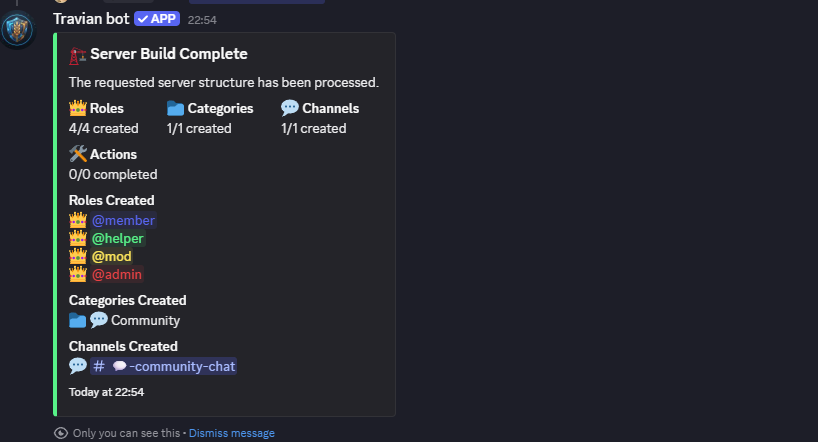
There are limits so one request does not accidentally go too far. In one run, it can process up to 12 roles, 8 categories, 40 channels, and 250 changes. Deleting things also requires a clear request; the bot will not randomly remove channels just because the description was vague.
This feature is still in development. It already works well for many server setup and cleanup tasks, but I expect to keep improving how it understands requests and how it handles more complex Discord server layouts.
/create-me-a-server. The bot needs
Manage Roles, Manage Channels, View Channels, and
Send Messages. Its role also needs to be high enough to create or manage the target
roles and channels.
/create-me-a-server, send them to
[email protected].
Final Notes
The short version is simple: email notifications help important requests reach people outside Discord,
welcome chat makes verification easier for new members, role select lets members manage their own
player type roles, temporary verify gives leadership a controlled 12-hour access tool, and
/create-me-a-server makes server setup much faster.
If anything does not work as expected, or if you want more onboarding options added, contact me through
/support.
Regards,
Max