Travian Artefact Tracking in Discord | Assignments and Leaderboards
Hello everyone,
This update is about the new artefact tracking system. Like some of the earlier updates, this feature is built to keep more coordination inside Discord while still giving server staff a clean website view when they need one. In practice, it combines a request channel, direct self-assignment commands, a live embed, and a private leaderboard page into one flow.
What the Artefact Feature Does
The goal is simple: let players claim which artefact they currently hold, keep that claim attached to their Discord identity, and show the full server picture in a way that leadership can check quickly.
Right now the bot tracks 10 supported artefacts:
 Architect's Secret
 Trainer's Talent
 Titan Boots
 Eagle's Eyes
 Diet Control
 Rival's Confusion
 Storage Masterplan
 Cranny/Catapult Artifact
 Artefact of the Fool
 Construction Plans
Each user can have one current assignment at a time. If they assign a different artefact later, the old one is replaced automatically.
Two Ways to Claim or Remove an Artefact
There are two main ways to use it.
The first way is through the request channel configured with /arti-request-channel. Once
that channel is set, members can simply write a natural message such as I have Titan Boots
and the bot will parse it, save the assignment, react to the message, and reply with the result.
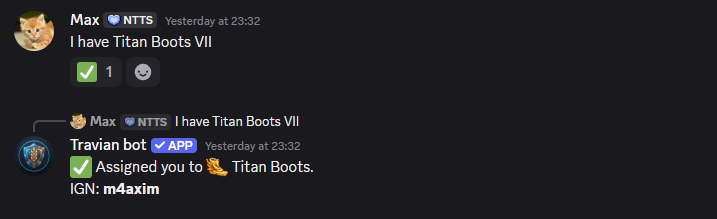
The parser is flexible on purpose. It supports artefact aliases such as shorter names like
Titan Boots, boots, plans, fool, and similar
recognised variants.
Removal can also be done through normal text. Messages such as
I am no longer having it, remove, unassign, or similar removal
phrasing are treated as a request to clear the current assignment.
The second way is with slash commands. Users can claim through /assign-arti and remove
their current claim through /de-assign. This is useful for people who prefer explicit
command input over natural message parsing.
Live Embed in Discord
Admins can publish the live overview into any text channel with /arti-embed. After that,
the bot keeps one central embed updated automatically whenever a member claims a new artefact or removes
an existing one.
The embed groups all 10 artefacts in one message and shows how many users are currently assigned to each
one. If nobody has claimed a specific artefact yet, it clearly shows No one assigned.
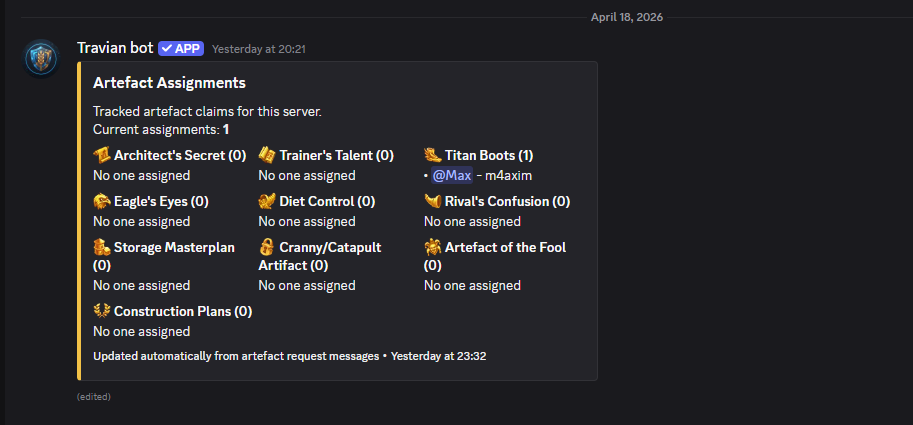
This is especially useful for server leadership because they do not need to manually collect claims from different messages. The embed is effectively the quick-glance version of the feature.
Private Website Leaderboard
For a more complete view, users can run /arti-leaderboard. The bot then sends a private
link that opens the website leaderboard page.
That link is intentionally temporary. It is valid for 30 minutes, and the page itself refreshes in the background every 30 seconds so the displayed data stays current while you are viewing it.
The leaderboard page shows the total number of assignments, the number of supported artefacts, the last refresh time, and then a separate card for every artefact with the current claimed users underneath.
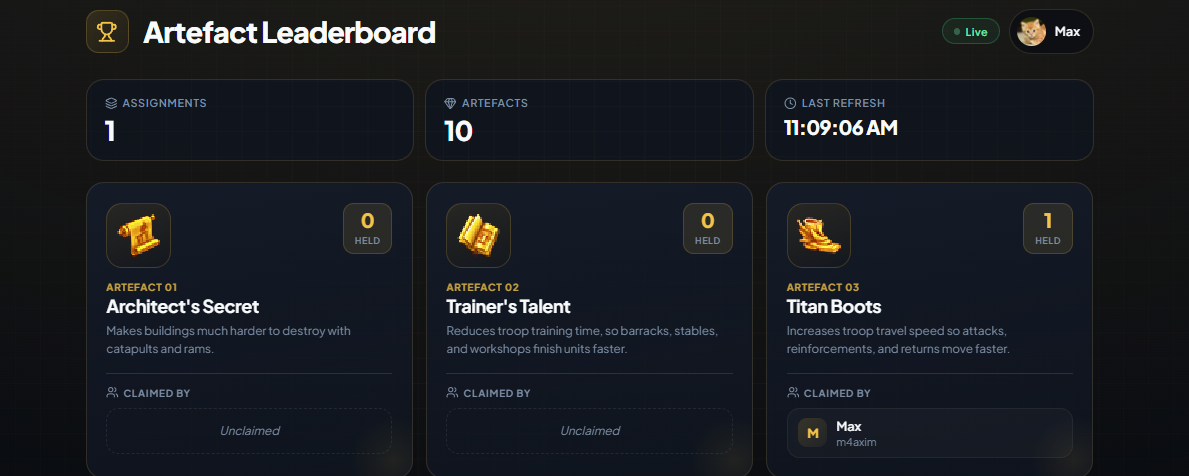
This follows the same overall direction as earlier features such as transcripts, All Actions, and the calendar: coordination starts in Discord, but the website gives a cleaner long-form view when needed.
Permissions and Access
The artefact feature is protected by the same access system used for other premium or trial-based bot features. If a server does not have active access, the artefact commands cannot be used and messages in the artefact request channel are rejected.
Creating or changing the request channel with /arti-request-channel and publishing the live
embed with /arti-embed is limited to server admins, the configured bot admin role or user,
or the server owner.
Regular members can still manage their own claim through the request channel or the self-service slash commands as long as the server has active access.
Final Notes
I think this will make artefact coordination much easier, especially for alliances that want one clean source of truth instead of scattered claims across chat messages and screenshots.
That should be all for this update. If you notice anything unclear or not working correctly, feel free
to contact me using /support.
Regards,
Max