Travian Defence Screenshot Parsing and Troop Amount Prompts
Hello everyone,
This update is about defence request screenshots. Until now, the cleanest way to create a defence request was to write the coordinates, amount, and arrival time in text. That still works, but now the bot can also read Travian incoming attack screenshots and turn them into defence requests.
Defence Screenshot Parsing
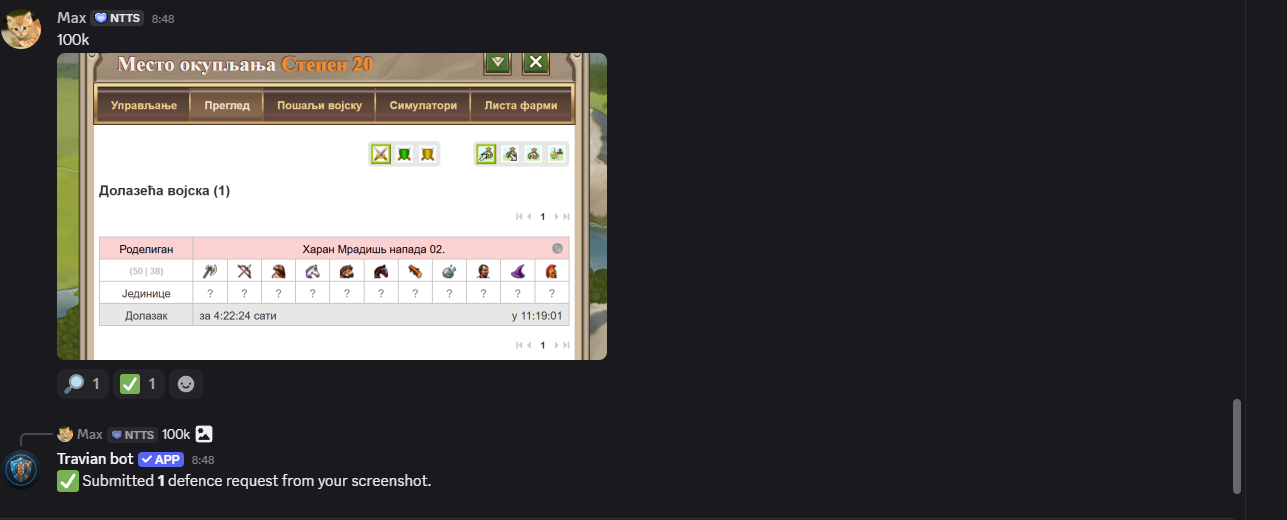
If you post an image in the defence request channel, the bot checks if it is a supported image and then reads the visible incoming attacks. It looks for the attacked village coordinates, the village name when visible, and the arrival time.
The important part is that the coordinates are treated as the defender village coordinates. So if the screenshot shows incoming attacks to your village, the bot uses that village as the target for the defence request.
How the Bot Handles the Screenshot
After the screenshot is posted, the bot reacts with a search reaction while it is reading the image. If the image is readable, it groups attacks by attacked village. If several attacks are going to the same coordinates, the bot keeps them together and uses the earliest visible arrival time.
This matters for real defence usage because one village can have multiple incoming attacks. Instead of creating noise for every single line, the bot understands that they belong to the same defended village and creates the request around that target.
png, jpg, webp, heic, and heif. Very
large images are rejected so the bot does not get stuck processing huge files.
Troop Amounts Through DM
A screenshot usually shows where attacks are landing, but it does not always clearly say how many defence troops you want. When the amount is missing or not clear enough, the bot sends you a private DM asking for the amount.
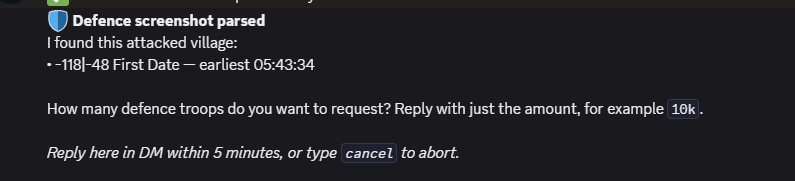
If there is one attacked village, you can reply with something simple like 10k. If there
are multiple attacked villages, you can use 10k each or write separate amounts for each
coordinate.
The DM reply is only open for 5 minutes. You can also type cancel if you do not want the
screenshot to create a request anymore.
Caption Amounts
If you already include a clear amount in the original screenshot message, the bot can use that text
directly. For example, if the screenshot is posted with a caption like 80k units needed,
the bot tries to combine the screenshot target with that amount.
If the caption is not safe enough to apply, it falls back to the DM question instead of guessing. I think this is the better behavior for defence requests because a wrong amount can create more problems than a short clarification.
Final Notes
This should make emergency defence requests faster, especially when someone is on mobile or when typing coordinates manually would take too long. Text requests still work the same as before, but now screenshots are part of the normal defence flow too.
If the bot cannot read a screenshot correctly, send the request in text or contact me through
/support with the image so I can improve the parsing.
Regards,
Max